Adding Hymns
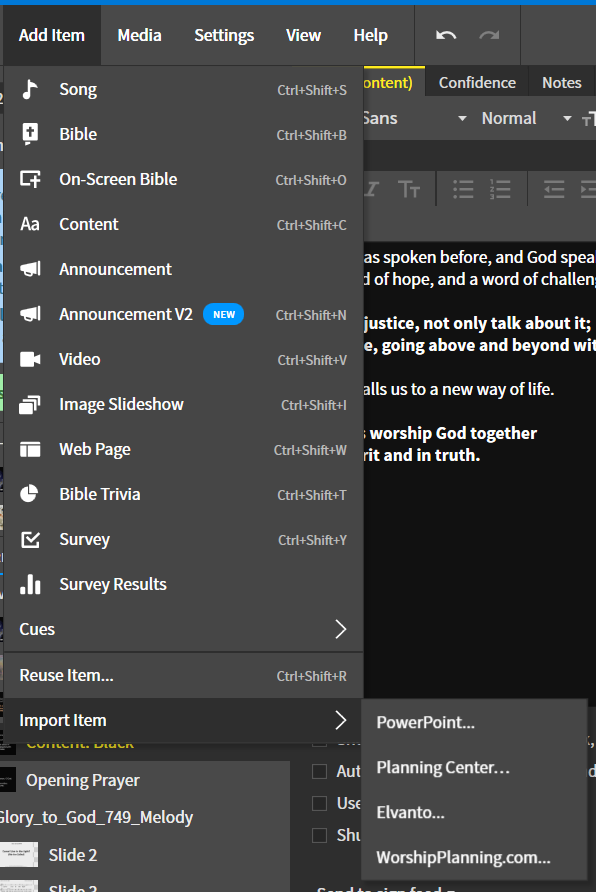
1. Import Item
Add a new hymn by doing the following:
On a Mac it will likely show Keynote/PowerPoint...
2. Find Hymn in GTG Folder
Find the hymn in the Glory to God folder that you want to import. The GTG folder is laid out in the following template:
GTG:
├─ Hymns for Projection/
│  └─ Hymns by Number/
│     ├─ Harmony.pdf
│     ├─ Harmony.ppt
│     ├─ Lyrics Only.pdf
│     ├─ Lyrics Only.ppt
│     ├─ Melody.pdf
│     ├─ Melody.ppt
└─ Instructions and Permissions/
   └─ Copyright Information
You want to select the Melody PPT to import into Proclaim.
3. Import
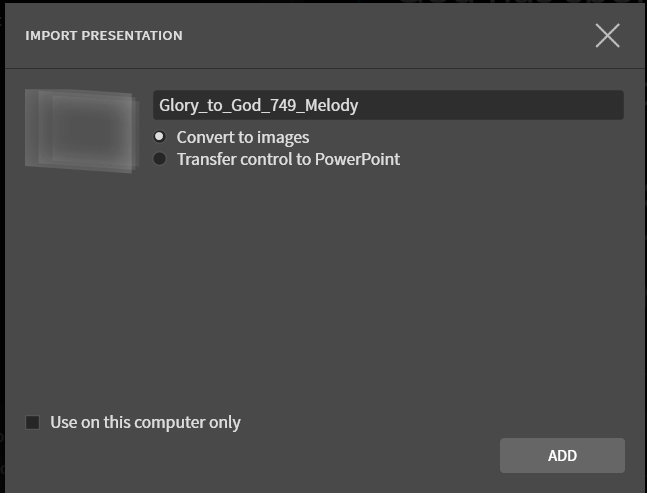
After you find the hymn you want, make sure of the following settings:
Convert to imagesis toggled- The box for
Use on this computer onlyis not checked.
Then, click ADD.
4. Delete Slides
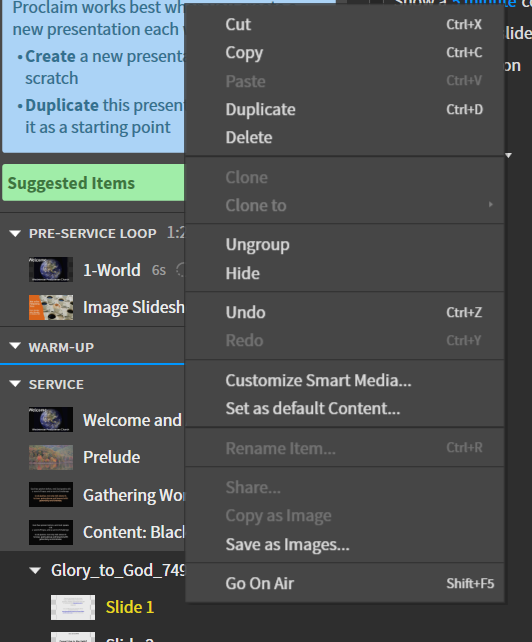
If there is a copyright slide at the beginning, or verses that are not being sung, delete them from the slideshow.
Opposite click on the slide you want to delete and click Delete in the dropdown menu.
Last update: November 15, 2022